Early-bird price, until Dec 8: $4.99, from December 9 $9.99. See all prices
Watch sample videos free, no account needed
These are AI-made examples, not real footage. Recorded calls are about 15 seconds and use Santa’s workshop, without a home photo.
Before Christmas
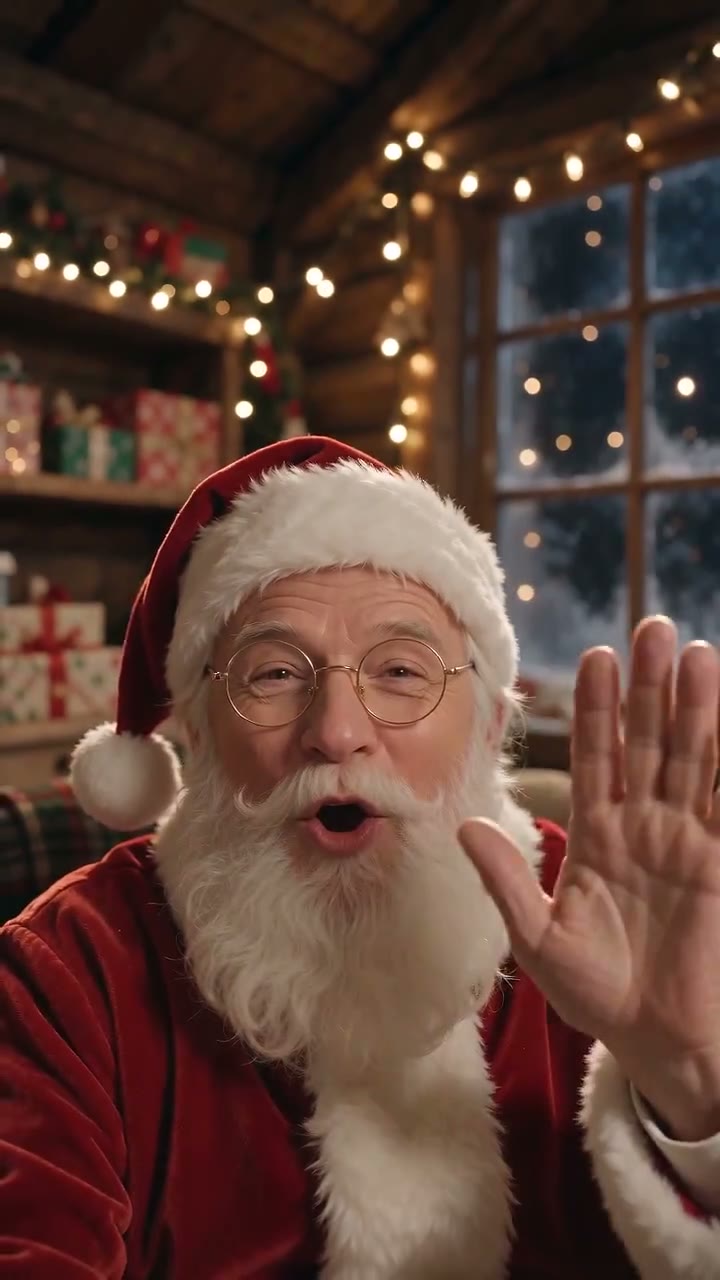
Santa waves from his workshop, says your child's name and pauses as if listening. A recorded pretend call, about 15 seconds, not live.
About 15 seconds
Is there a real Santa phone number?
No. Santa has no official phone number, FaceTime contact or WhatsApp account. Numbers shared online as Santa’s number are usually a recorded message line, a company promotion that changes every year, or a premium-rate line billed by the minute. We never list a number, because nobody can check who runs it this season.
Before your child dials anything, call it yourself and listen. Check whether it costs extra, asks for personal details or tries to sell something. Never give your address, your child’s full name or payment details to a number found in a social media post. A message asking you to tap a link to claim a call from Santa is very likely a scam.
Searches for where Santa is right now usually lead to NORAD Tracks Santa, which follows his journey on Christmas Eve. That is a tracker to watch together, not a chat with Santa.
FaceTime, Zoom and text messages from Santa
You cannot FaceTime Santa directly. What parents call a Santa FaceTime is usually a recorded video made to look like a call, or a relative in a costume on a video chat. A recorded video plays the same way every time: it can say your child’s name, but it cannot hear what your child says back.
Texts and WhatsApp messages from Santa are always written by someone: a parent, a relative or a service. They can be lovely for a child who reads, and they work at any hour. Keep them short, and never let an unknown account message your child directly.
Smart speakers and letters
Some smart speakers have offered Santa voice apps in past seasons. What exists changes each year and from country to country, so ask your speaker in early December and try it yourself first. These apps are usually a general voice with set replies, not a conversation about your child.
Letters are the oldest way to talk to Santa and still one of the best for children who like to write or draw. In several countries the national postal service runs a letters-to-Santa program each December, sometimes with a reply. Check your own postal service for this year’s address and last posting date.
Every option side by side
| Option | Interactive? | What you need | Best for |
|---|---|---|---|
| Phone hotline | Usually a recorded message | A phone, and a check of the cost first | Older kids, with a parent listening |
| Text or WhatsApp message | One way, written by an adult | A phone and someone to write it | Children who can read |
| Smart speaker app | Set replies only | A speaker and an app offered this year | A quick bedtime surprise |
| Letter to Santa | A reply, if your postal service sends one | Paper, a stamp and time | Writers and drawers of any age |
| Recorded Video call | No, it plays the same each time | Your child’s first name, no photo | Toddlers and first-timers |
| Live AI Santa video call | Yes, AI Santa hears and answers | A phone or laptop with a microphone | Kids ready for a real chat |
Recorded Video call or live AI Santa call?
Santa Cam makes two different things that both look like a call. The Video call style is a recorded pretend call: Santa waves from his workshop, says your child’s first name, pauses as if listening and asks what they would like for Christmas. It needs no photo, lasts about 15 seconds and downloads as an MP4 you can play whenever you like. Make one with the recorded Video call tool.
The live Santa video call is AI Santa, not a real person. He hears your child and answers live, with captions on screen. Before each call you add your child’s first name, age and up to two family details, so he can mention things only your family knows. Minutes count only while Santa is on screen.
Choose by age, and plan for Christmas Eve
Live calls run through Dec 31, Christmas Eve included, but evenings close to Christmas are busy. If the line is busy you wait in a short queue, and waiting uses no minutes. For a recorded video, most are ready in 5 to 10 minutes; order by December 23 to leave room. A shy child can start with the gentle first steps for kids scared of Santa, and the very youngest have their own guide to Santa for toddlers.
- Under 3: a short recorded video, watched together and replayed as often as they like.
- Ages 3 to 5: a recorded video first, then a live call if they enjoy video chats with grandparents.
- Ages 6 to 9: a live call, with two or three questions planned together beforehand.
- Ages 10 and up: a letter, or a live call they lead themselves while you stay in the room.
Questions about this guide
Is there a free number to call Santa?
There is no official Santa number, free or paid. Lines shared online are run by companies or individuals, change from year to year and can charge by the minute, so try one yourself before your child calls.
Can my child FaceTime Santa on an iPhone?
Not as a real FaceTime contact. You can play a recorded Santa Video call on any phone, or start a live AI Santa video call in the browser. Neither needs an app.
Can Santa reply to a text or WhatsApp message?
Only if an adult writes the reply. For a voice that answers your child, the live AI Santa call hears what your child says and responds, while you stay in the room.
What are good questions for a child to ask Santa?
Easy, friendly ones work best: how the reindeer are, what the elves are making, what Santa eats for breakfast or how he visits so many homes. Let your child pick one or two and practise them first.
Is talking to an AI Santa safe for kids?
Stay with your child for the whole call. AI Santa keeps it kind, never sells anything and does not see your child: the camera view stays only on your phone. You can end the call at any moment.